dbForge Edge 2026.1: AI PostgreSQL Development Tool
Note: This post is written and sponsored by Devart.
dbForge Edge 2026.1: AI-Powered PostgreSQL Development with Schema Compare and Cloud Support
PostgreSQL’s adoption keeps climbing. In 2025, 55.6% of professional developers used it, up from 48.7% the year before. That’s the biggest single-year jump in its history, and the third consecutive year it’s topped the Stack Overflow Developer Survey.
But as more teams adopt PostgreSQL development, managing development, schema changes, query optimization, and deployments is getting more complex. For a lot of teams, that complexity is spread across multiple tools. It gets the job done, but it’s not exactly smooth.
That’s what dbForge Edge 2026.1 is built to address. This release brings these tasks together in a single workspace: AI-assisted querying, visual query building, and solid schema comparison tools included. As a multi database IDE covering PostgreSQL, MySQL, SQL Server, Oracle, and a wide range of cloud services , it’s a simpler way to work across the full PostgreSQL database management lifecycle.
In this article, we’ll walk through the new capabilities in dbForge Edge 2026.1 and how they can help streamline your everyday PostgreSQL workflows.
Why PostgreSQL teams need faster query, schema, and cloud workflows
Today, most PostgreSQL database management tool setups are more fragmented than they need to be. SQL gets written in one tool, schema comparisons happen in another, cloud connections get managed somewhere else entirely. It works, until something breaks and you're spending twenty minutes just figuring out which environment the problem lives in.
The friction points that slow teams down most include:
- Writing complex SQL by hand. Multi-table JOINs across large schemas require you to hold a lot of structure in your head at once. One incorrect JOIN, one misremembered column name, and you're debugging instead of building.
- Tuning queries without index context. Optimizing an execution plan is guesswork when you can't see which indexes exist and which ones are actually being used. You end up changing things and hoping.
- Schema drift between environments. Someone applies a hotfix to production. Someone else adds a column to staging. Nobody tells the other team. Then deployment day arrives. Syncari puts the average cost of an unmanaged schema drift incident at $35,000, and that's before you count the engineering hours spent debugging it.
- Manual object auditing. Spotting structural differences between two database environments by hand is the kind of work that takes an hour and produces a list you're not fully confident in.
- Too many separate tools. Running different applications for SQL coding, schema sync, and cloud administration means constant context-switching. You're not just switching tasks—you're also adapting to different interfaces, workflows, and ways of working, creating a productivity tax that's easy to ignore until you add it up.
None of these are unsolvable problems. They're just problems that get worse the longer they go unaddressed.
What changed in dbForge Edge 2026.1 for PostgreSQL users
The 2026.1 release makes structural changes to how daily PostgreSQL database tool work actually flows: from first query draft through to deployment. Here's what's new.
AI Assistant with better database context
The dbForge AI Assistant has always been able to generate and explain SQL. What's new in 2026.1 is that it now has access to your database index metadata (clustered, composite, and unique indexes) which makes a real difference when you're asking it to help with PostgreSQL query optimization.
Instead of giving you a generic answer, it inspects your query against your actual schema and flags specific issues: missing index coverage, inefficient join paths, cases where a query structure is working against the indexes you already have. It explains the recommendation, not just the fix. That's useful for the immediate problem, but it's also how junior developers actually learn, seeing the reasoning, not just the output.
The rest of the core capabilities are still there: generate a query from a plain English description (or any language you prefer), paste in a legacy query and get a clear explanation of what it does, drop in a broken query and get a corrected version with an explanation of what went wrong.
And before anything hits production, you can run a pre-execution review to catch missing join criteria or logic that might return unexpected results. It's the kind of first-pass safety net that saves you from the slow queries and edge cases you didn't think to check for.
Visual Query Builder for PostgreSQL
The big headline for PostgreSQL in this release is a full PostgreSQL Visual Query Builder, and it does what it says. You drag tables onto a canvas, set your join conditions through a point-and-click interface, and the tool generates syntactically accurate PostgreSQL SQL as you build. No typing required to get something runnable.
Everything you'd want is covered visually: multi-key joins, conditional WHERE filters, GROUP BY and HAVING clauses, multi-column sort orders. As you build on the canvas, the SQL updates to reflect your current diagram: so when you're done, the query is ready to run or copy straight away.
This is genuinely useful for analysts and junior developers who need to query large schemas without having every table relationship memorized. It's also fast for ad-hoc reporting: building a one-off query on a canvas is quicker than writing it from scratch, especially when you're working with a schema that has dozens of related tables. And because the join logic is visible, the query is easier to hand off and easier to review. Someone else can look at the canvas and understand what the query does without reading through the SQL.
Stronger PostgreSQL Schema Compare and synchronization
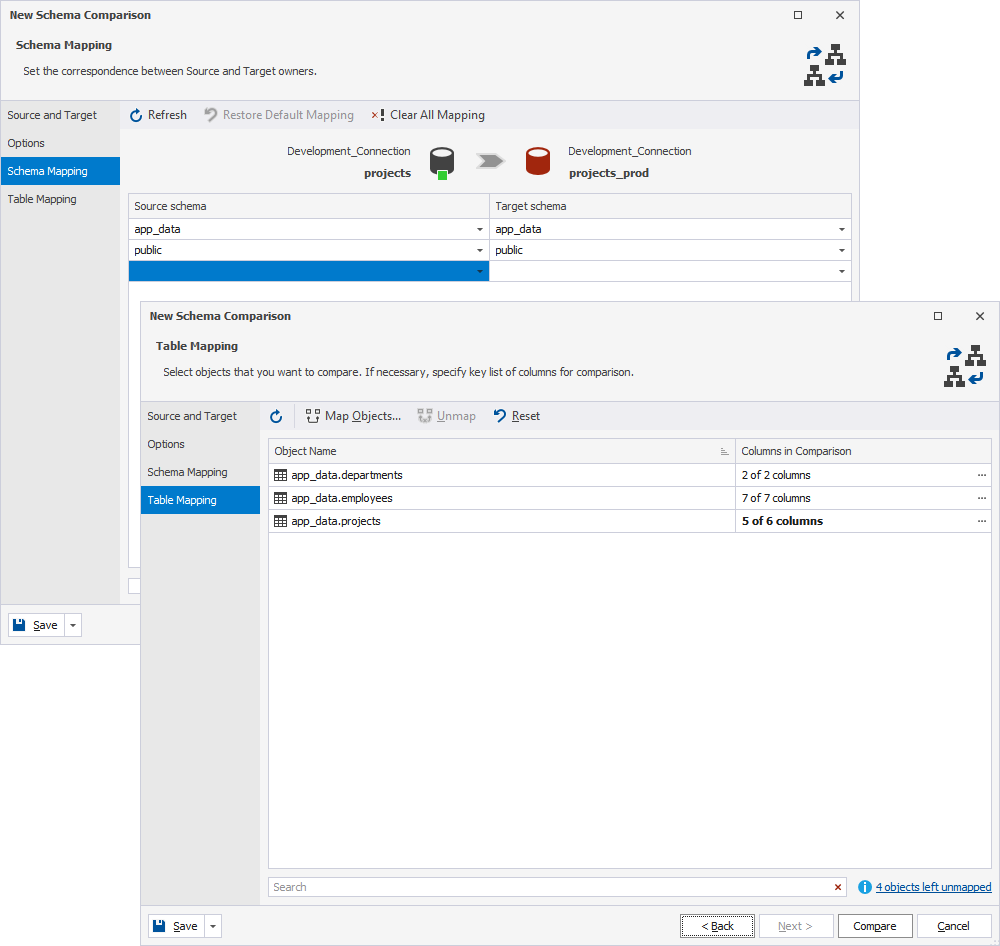
Schema comparison gets some of the most significant changes in this release. The PostgreSQL Schema Compare tool engine now delivers better accuracy in structural diff detection, with more control over how results are applied.
The additions that matter most in practice are schema and table mapping for environments with different naming conventions, more granular synchronization options so you can include or exclude specific object types, and improved index comparison that surface differences earlier versions would miss. If you've ever had a sync script apply something it shouldn't have because the comparison wasn't precise enough, these improvements are directly aimed at that problem.
The output is a DDL synchronization script you review before anything runs. That step (comparing, reviewing, then executing) is what separates a controlled deployment from a manual one you're hoping goes right. Having a database schema comparison tool that's reliable enough to trust across dev, test, staging, production, and cloud environments is what makes that process repeatable rather than stressful.
Visual table editor for PostgreSQL database design
The visual table editor takes care of the DDL work most developers find tedious. Columns, data types, constraints, default values, check expressions, foreign key relationships, indexes: you manage all of it through a visual interface instead of writing every statement by hand.
As you make changes visually, the editor generates the underlying DDL from your inputs. That matters because the kind of errors that are hardest to trace (a missed NOT NULL constraint, a wrongly typed default) tend to show up as application failures that look nothing like the schema change that caused them. Having the DDL generated from what you specified visually rather than typed manually removes a real source of those errors.
For PostgreSQL database management software workflows where table structures are changing frequently during an active development sprint, that's a meaningful improvement.
How dbForge AI Assistant improves PostgreSQL development
The dbForge AI Assistant is schema-aware. That's the part that matters. It's not a generic SQL chatbot: it generates and reviews queries based on your actual tables, columns, and data types. So when it gives you something, it's grounded in your environment, not a template.
Here's what it actually handles day-to-day:
- Natural language to SQL. You type something like "get the top 10 customers by revenue from Q3, grouped by region" and it generates a query that uses your actual column names and join paths. That's where an AI SQL query generator pays for itself most quickly, especially for repetitive reporting queries you're writing variations of constantly.
- Explaining legacy code. Paste in a query that's been in the codebase for three years and nobody fully understands. The assistant breaks it down: joins, subquery dependencies, filter logic, output structure. Junior developers get context fast; senior developers spend less time on code reviews.
- Query optimization. It inspects your query against the live schema, flags missing index coverage and inefficient join paths, and explains the recommendation. Not just "add an index here," it tells you why.
- Error troubleshooting. When something fails, it identifies the line, explains the problem (ambiguous column references, type mismatches, missing aliases) and gives you a corrected version.
- Pre-execution review. Before running against production, it scans for missing join criteria or logic that might return unexpected row counts. Catching those before execution is always cheaper than finding them after.
That's what a well-implemented AI database assistant should do: not take over your work, but remove the friction that slows it down. The judgment stays with you. The grunt work doesn't.
Why a visual query builder still matters in AI-powered PostgreSQL workflows
AI is useful. But it's not infallible. A PostgreSQL AI tool can produce queries with subtle logic problems (correct syntax, wrong intent) particularly on multi-table queries where join order matters and the business rules aren't obvious from the schema alone. You still need to check the output.
That's where the PostgreSQL IDE visual query builder earns its place alongside the AI assistant. Think of it this way: AI helps you get to a first draft fast. The visual builder helps you verify it's actually right. An analyst can use the assistant to generate an initial query, then pull it into the visual canvas to confirm every join condition, filter, and grouping is exactly what was intended. The two tools are not competing, they're covering different parts of the same problem.
| Task Dimension | dbForge AI Assistant | Visual Query Builder |
|---|---|---|
| Primary Strength | Rapidly builds initial queries and clarifies complex, legacy SQL code. | Precise layout control over joins, filters, grouping, and sort order. |
| Best Used For | Exploratory queries, first drafts, and troubleshooting syntax errors. | Multi-table reporting, complex analysis, and structural validation. |
| Ideal User | Developers needing quick SQL drafts and optimizations. | Data analysts, QA engineers, and visual database architects. |
| Schema Interaction | Converts natural language into code based on active metadata. | Drag-and-drop canvas showing live table relationships. |
There's another practical benefit worth mentioning. For teams working with large schemas, the visual builder reduces dependency on whoever has the schema memorized. When join logic is visible on a canvas, the query documents itself. It does this in a way that’s easier to hand off, easier to maintain, easier to audit six months later when nobody remembers why that WHERE clause is there.
There's also a speed advantage. In many cases, it's faster to drag a few tables onto a canvas and have the joins created automatically than to write a detailed prompt explaining the same relationships to an AI. For exploratory work, the visual approach often gets you to a working query with less effort.
Managing PostgreSQL schema changes with Schema Compare
Schema consistency across environments is one of those things that feels fine until it isn't. A column gets added to staging that doesn't exist in production. A constraint gets removed in dev and nobody updates the deployment script. Then you run the migration and something breaks in a way that takes two hours to trace back to a four-line schema difference.
That's the problem the PostgreSQL Schema Compare tool in dbForge Edge 2026.1 is built to prevent. It's a solid PostgreSQL development tool for teams that deploy regularly and can't afford to skip the comparison step: which, in practice, is the step that gets skipped most often when deadlines are tight.
Here's how a reliable pre-deployment workflow actually looks with it:
- Compare before every deployment. Run your development schema against staging and production and map every difference before anything moves. This catches the exact category of incident that schema drift is known for, changes that look fine locally but conflict with what's actually in production.
- Review across all object types. Tables, indexes, constraints, foreign keys, triggers, views, sequences, stored procedures. The comparison is thorough, it's not just checking table structures.
- Handle different naming conventions. When environments have diverged in naming (common in teams that have grown organically or merged) custom schema and table mapping rules let you match the right objects without renaming anything.
- Generate scripts, don't apply blindly. The tool outputs a DDL script you review and modify before running. Deployment changes stay auditable. You can schedule them, share them for review, or roll them back if needed.
- Compare cloud and local schemas in the same workflow. Hybrid environments (one schema on-premises, one on AWS RDS or Azure) are handled without needing a separate tool.
At $35,000 average cost per unmanaged drift incident, a database schema comparison tool that actually gets used isn't overhead, it's risk management. The value compounds the more often you deploy.
Cloud PostgreSQL support for modern database teams
Chances are your PostgreSQL setup isn't just one server anymore. Most teams are managing connections across local dev environments, remote test servers, and managed cloud services: Supabase, Heroku, TimescaleDB, AWS RDS, Azure Database for PostgreSQL, Google Cloud SQL. And if you're using a different tool for each one, you're creating inconsistency in how queries get written, tested, and deployed.
dbForge Edge acts as a unified cloud database development tool that behaves the same way regardless of where your database lives. You connect to local containers, cloud-managed instances, and hybrid environments through a single solution. Schema comparison, query validation, and sync scripts all work the same way whether you're targeting an on-premises server or a managed cloud service.
For PostgreSQL GUI tool workflows that span multiple environments, that consistency matters a lot. For example, you compare a local schema against a production instance on AWS RDS, the comparison engine applies the same logic, the same object-level detail, the same sync script output. There's no mental adjustment for which environment you're in. That makes it easier to enforce the same standards everywhere and harder to miss a difference because you were in the wrong mental mode.
And if your team is managing PostgreSQL alongside other databases (MySQL, SQL Server, Oracle) capabilities are now unified within dbForge Edge's multi-database environment. You have access to four tools, one interface, the same AI assistant and schema compare engine across your whole stack. Teams that previously kept separate tools for each DBMS can consolidate without losing any PostgreSQL-specific functionality.
Final Takeaway
dbForge Edge 2026.1 is not trying to reinvent how PostgreSQL development works. It's addressing the specific friction that slows it down: writing SQL by hand when AI can give you a solid starting point, tuning queries without index context, letting schemas drift between environments until something breaks, and juggling separate tools for work that should happen in one place.
What you actually get with this release is an AI assistant for PostgreSQL query optimization that works from your live schema, not a generic template. You get a visual query builder that makes it easy to verify the logic AI generates, a schema compare engine with proper mapping and index comparison for environments that have drifted, and consistent cloud support so you're not treating each environment as a special case.
If you're an engineer dealing with slow queries, a DBA managing deployments across multiple environments, or an analyst who just needs to build reports without memorizing every table relationship, this is a practical upgrade to your PostgreSQL database management setup.
Get a free trial of dbForge Edge 2026.1 and see how it fits into your actual workflow.