Bonus: Database Design for an eCommerce Website
What's in this guide
This guide goes with my YouTube video on designing a database for an eCommerce website. In it, you'll find:
- The Entity Relationship Diagram for an eCommerce website from the video
- An explanation of the purpose of each table and column, with sample data
- An SQL script to create each of these tables
Prefer a PDF? You can download the PDF version of this guide.
Entity Relationship Diagram
Here's the ERD for this database:
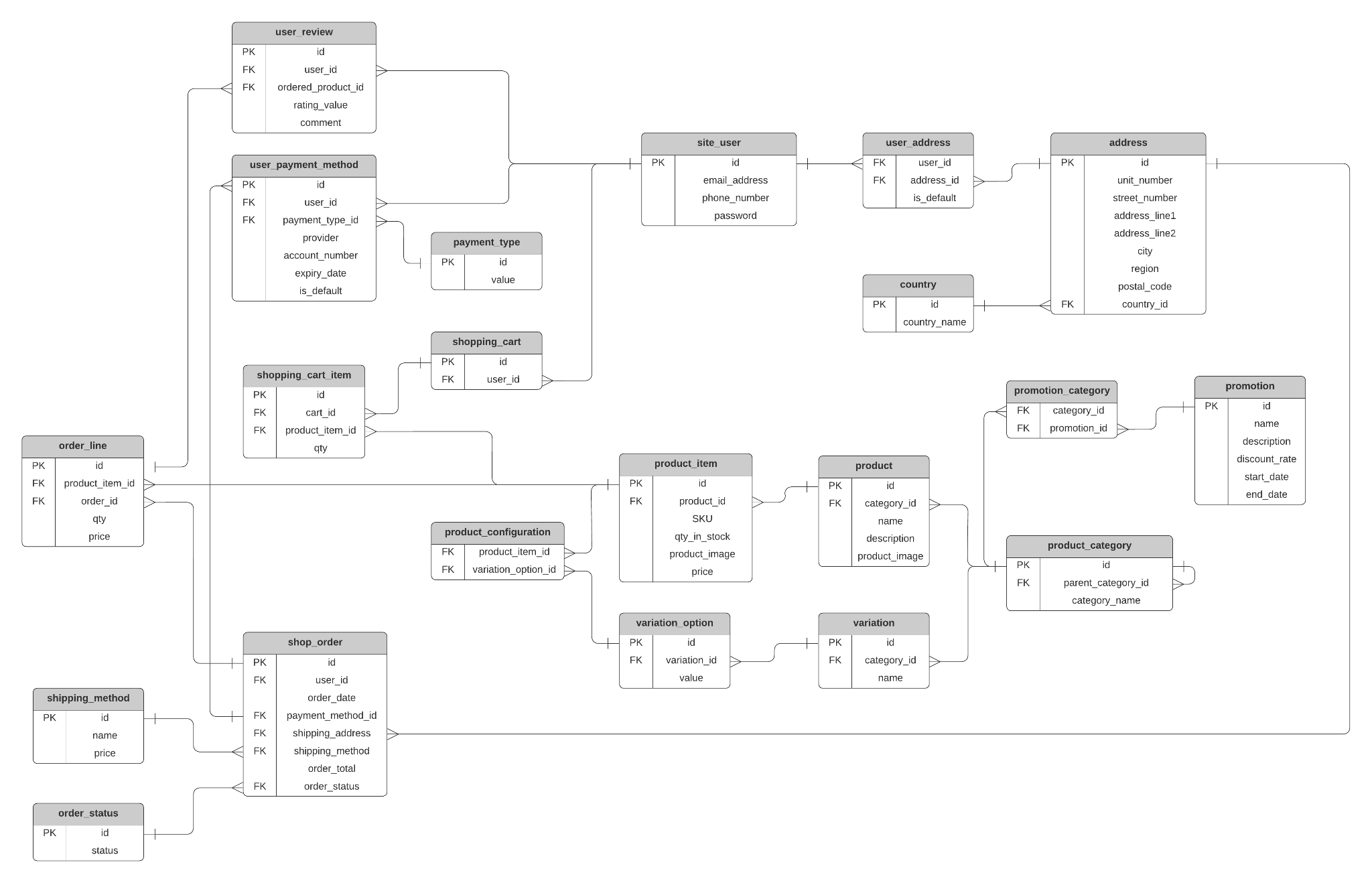
The Tables
This section explains each of the 21 tables and their columns.
site_user
A registered user of the website who can place orders.
| Column | Description | Sample Data |
|---|---|---|
| id | Primary key. A unique identifier for the row. | 1, 2, 3 |
| email_address | The email address for the user, which can be used to send order details to and to log in. | john@apple.com |
| phone_number | The phone number for the user which can be used to contact them. | 0139029321 |
| password | The password for the user's account on the website | An encrypted text value |
user_address
A record of each of the addresses that a user has over their lifetime in the system.
| Column | Description | Sample Data |
|---|---|---|
| user_id | A foreign key to the site_user table which represents the user record. | 1, 2, 3 |
| address_id | A foreign key to the address table which represents the address record. | 1, 6, 20 |
| is_default | A boolean value to indicate whether this address for this user is the user's default address when placing an order. | 1, 0 |
address
A list of all of the addresses entered into the system, which are used to deliver orders.
| Column | Description | Sample Data |
|---|---|---|
| id | Primary key. A unique identifier for the row. | 1, 2, 3 |
| unit_number | The unit number for this address. | 55A, 8, 1 |
| street_number | The street number for this address. | 10, 45, 10015 |
| address_line1 | This will usually contain the street name and type of street | Johnston St, Main Road |
| address_line2 | This will usually contain the suburb, but could contain other information depending on the country. | South Croydon, Brooklyn |
| city | The city that the address is in. | Portland, Sydney, Rome |
| region | The region that the address is in, which could be a state or a province. | California, Queensland, British Columbia |
| postal_code | The postal code for this address. | 3000, 90210, NW1 |
| country_id | A foreign key to the country table to represent the country for this address. | 2, 4, 17 |
country
A lookup table for countries which are used for addresses.
| Column | Description | Sample Data |
|---|---|---|
| id | Primary key. A unique identifier for the row. | 1, 2, 3 |
| country_name | The name of the country | Australia United States of America France |
user_review
A record of a review left by a user for a product.
| Column | Description | Sample Data |
|---|---|---|
| id | Primary key. A unique identifier for the row. | 1, 2, 3 |
| user_id | A foreign key to relate to the user who left the review. | 1, 4, 8 |
| ordered_product_id | A foreign key to the order_line table, to relate to the product that was ordered. | 4, 89, 102 |
| rating_value | A value, such as from 1 to 5, that the user has left as part of the review for this product. | 3, 5 |
| comment | A text comment or written review for this product. | "This product met my expectations and is very sturdy." |
user_payment_method
A list of payment methods that the user has set up for their account.
| Column | Description | Sample Data |
|---|---|---|
| id | Primary key. A unique identifier for the row. | 1, 2, 3 |
| user_id | A foreign key to the user table to indicate the user that this payment method is for. | 1, 4, 19 |
| payment_type_id | A foreign key to the payment_type table to indicate the type of payment. | 2, 3 |
| provider | The provider of this payment method | Mastercard, Visa |
| account_number | The bank account number or credit card number for this payment | 1234 5678 9012 3456 |
| expiry_date | The expiry date for the payment method, if applicable. | 10/25 |
| is_default | A boolean value to indicate whether this is the default payment method for the user. | 1, 0 |
Note: you may not want to store the full account number in this table due to payment card regulations. This design just shows where it may be stored in relation to everything else about the user.
payment_type
A lookup table of payment types for the payment methods.
| Column | Description | Sample Data |
|---|---|---|
| id | Primary key. A unique identifier for the row. | 1, 2, 3 |
| value | The payment type name or details. | Credit Card, PayPal |
shopping_cart
A record of the shopping carts that a user can set up for their account.
| Column | Description | Sample Data |
|---|---|---|
| id | Primary key. A unique identifier for the row. | 1, 2, 3 |
| user_id | A foreign key to the user table to indicate which user owns the shopping cart. | 2, 4, 19 |
shopping_cart_item
The products that belong to a shopping cart for a user.
| Column | Description | Sample Data |
|---|---|---|
| id | Primary key. A unique identifier for the row. | 1, 2, 3 |
| cart_id | A foreign key to the shopping_cart table to indicate which shopping cart this record belongs to. | 4, 8, 102 |
| product_item_id | A foreign key to the product_item table to indicate which product_item is included in the shopping cart. | 45, 10, 301 |
| qty | The quantity of this item for the shopping cart. | 1, 2, 10 |
shop_order
A record of an order that a user has placed for one or more products.
| Column | Description | Sample Data |
|---|---|---|
| id | Primary key. A unique identifier for the row. | 1, 2, 3 |
| user_id | A foreign key to the user table to indicate the user that placed the order. | 34, 10, 201 |
| order_date | The date and time that the order was placed. | 2023-09-12 09:35:18 |
| payment_method_id | A foreign key to the payment_method table to indicate the payment method used for this order. | 13, 29, 40 |
| shipping_address | A foreign key to the address table to indicate the address used for this order. | 3, 10, 49 |
| shipping_method | A foreign key to the shipping_method table to indicate the shipping_method chosen for this order. | 1, 2 |
| order_total | The total amount paid for this order, which may include product prices and the shipping method price. | 210.00 1,823.95 95.50 |
| order_status | A foreign key to the order_status table to indicate where in the lifecycle that this order is up to. | 1, 3, 4 |
order_line
A record of a product for an order.
| Column | Description | Sample Data |
|---|---|---|
| id | Primary key. A unique identifier for the row. | 1, 2, 3 |
| product_item_id | A foreign key to the product_item table to indicate the product item added to this order. | 3, 19, 209 |
| order_id | A foreign key to the shop_order table to indicate which order this record is for. | 20, 103, 158 |
| qty | The number of these product items that have been added to this order. | 1, 5, 10 |
| price | The price of this product_item for this order. | 20.00, 190.00, 6.95 |
shipping_method
A lookup table of all of the shipping methods available for users.
| Column | Description | Sample Data |
|---|---|---|
| id | Primary key. A unique identifier for the row. | 1, 2, 3 |
| name | The name or description of this shipping method. | Standard, Express, Priority |
| price | The price the user pays for this shipping method | 10, 25, 50 |
order_status
A lookup table of the different statuses that an order can have.
| Column | Description | Sample Data |
|---|---|---|
| id | Primary key. A unique identifier for the row. | 1, 2, 3 |
| status | The name of the order status that is readable by the user. | Ordered, In Transit, Delivered, Cancelled |
product_category
A list of categories that the products belong to. It also allows for subcategories.
| Column | Description | Sample Data |
|---|---|---|
| id | Primary key. A unique identifier for the row. | 1, 2, 3 |
| parent_category_id | A foreign key to another record in this table to indicate the parent category of this category | NULL, 2, 6, 8 |
| category_name | The name of the category which is shown on the website | Clothing, Men's Shoes, Hair Products |
product
A representation of a product that is shown on a list of products page.
| Column | Description | Sample Data |
|---|---|---|
| id | Primary key. A unique identifier for the row. | 1, 2, 3 |
| category_id | A foreign key to the product_category table to represent the category this product belongs to. | 2, 5, 10 |
| name | A name of the product which can be shown on the product page or list of products page. | Under Armour joggers Nike football joggers Asics Gel Kayano 34 Runners |
| description | A long description of the product | "A comfortable pair of jogger pants, these pants will…" |
| product_image | A URL for the image for this product. | yoursite.com/images/product_ 002.png |
product_item
An instance of a product with all of its variations.
| Column | Description | Sample Data |
|---|---|---|
| id | Primary key. A unique identifier for the row. | 1, 2, 3 |
| product_id | A foreign key to the product table to indicate which product this item relates to. | 4, 10, 45 |
| SKU | A unique identifier for a product which may be shown on the website. | 10970973 |
| qty_in_stock | The number of items that the company has in stock. | 0, 10, 85 |
| product_image | A URL for the image for this product item, so that users can see different variations of the product on the page. | yoursite.com/images/product_ 00201.png |
| price | The price of this specific product item. | 6.95, 100.00, 149.95 |
variation
A list of properties that can be configured for products within a category, such as Size and Colour.
| Column | Description | Sample Data |
|---|---|---|
| id | Primary key. A unique identifier for the row. | 1, 2, 3 |
| category_id | A foreign key to the product_category table to represent the category this variation belongs to. | 2, 4, 7 |
| name | The name of this variation, which could be shown on the product page or used in filters. | Size, Colour, Material |
variation_option
A list of the possible values for each of the variations (such as S, M, L for the variation of Size).
| Column | Description | Sample Data |
|---|---|---|
| id | Primary key. A unique identifier for the row. | 1, 2, 3 |
| variation_id | A foreign key to the variation table tat represents the variation for this record. | 2, 5, 9 |
| value | The value that represents this option | S, M, L Blue, Red, Green Leather, Rubber, Suede |
product_configuration
A combination of all of the variation options for a product item, such as the "Nike Basic Jogger" having a Colour of Black and a Material of Cotton.
| Column | Description | Sample Data |
|---|---|---|
| product_item_id | A foreign key to the product_item table to indicate the product item for this record. | 2, 8, 102 |
| variation_option_id | A foreign key to the variation_option table to indicate the variation_option for this record | 3, 18, 20 |
promotion
A list of promotions that the company may offer.
| Column | Description | Sample Data |
|---|---|---|
| id | Primary key. A unique identifier for the row. | 1, 2, 3 |
| name | The name of the promotion which could be displayed on the website. | Summer Sale, Big Discount 2023 |
| description | A description of the promotion which may also be shown on the website. | "Get great discounts on a range of products for this summer!" |
| discount_rate | The percentage of discount applied to the products | 10%, 25%, 50% |
| start_date | The date the promotion starts | 2023-08-01 |
| end_date | The date the promotion ends | 2023-08-30 |
promotion_category
A list of promotions and the categories they apply to.
| Column | Description | Sample Data |
|---|---|---|
| category_id | A foreign key to the product_category table to represent the category for this record. | 12, 18, 21 |
| promotion_id | A foreign key to the promotion table to represent the promotion for this record. | 15, 19, 23 |
SQL Script
Here is the SQL code to create the tables for this database.
The script is written for MySQL, but it can easily be modified to work on your preferred database vendor by changing the data types and removing the IF EXISTS (if your database doesn't support it).
  1CREATE DATABASE ecommerce;
  2
  3USE ecommerce;
  4DROP TABLE IF EXISTS user_review;
  5DROP TABLE IF EXISTS order_line;
  6DROP TABLE IF EXISTS shop_order;
  7DROP TABLE IF EXISTS order_status;
  8DROP TABLE IF EXISTS shipping_method;
  9DROP TABLE IF EXISTS shopping_cart_item;
 10DROP TABLE IF EXISTS shopping_cart;
 11DROP TABLE IF EXISTS user_payment_method;
 12DROP TABLE IF EXISTS payment_type;
 13DROP TABLE IF EXISTS product_configuration;
 14DROP TABLE IF EXISTS variation_option;
 15DROP TABLE IF EXISTS variation;
 16DROP TABLE IF EXISTS product_item;
 17DROP TABLE IF EXISTS product;
 18DROP TABLE IF EXISTS promotion_category;
 19DROP TABLE IF EXISTS promotion;
 20DROP TABLE IF EXISTS product_category;
 21DROP TABLE IF EXISTS user_address;
 22DROP TABLE IF EXISTS site_user;
 23DROP TABLE IF EXISTS address;
 24DROP TABLE IF EXISTS country;
 25
 26CREATE TABLE country (
 27  id INT AUTO_INCREMENT,
 28  country_name VARCHAR(500),
 29  CONSTRAINT pk_country PRIMARY KEY (id)
 30);
 31
 32CREATE TABLE address (
 33  id INT AUTO_INCREMENT,
 34  unit_number VARCHAR(20),
 35  street_number VARCHAR(20),
 36  address_line1 VARCHAR(500),
 37  address_line2 VARCHAR(500),
 38  city VARCHAR(200),
 39  region VARCHAR(200),
 40  postal_code VARCHAR(20),
 41  country_id INT,
 42  CONSTRAINT pk_address PRIMARY KEY (id),
 43  CONSTRAINT fk_add_country FOREIGN KEY (country_id) REFERENCES country (id)
 44);
 45
 46CREATE TABLE site_user (
 47  id INT AUTO_INCREMENT,
 48  email_address VARCHAR(350),
 49  phone_number VARCHAR(20),
 50  password VARCHAR(500),
 51  CONSTRAINT pk_user PRIMARY KEY (id)
 52);
 53
 54CREATE TABLE user_address (
 55  user_id INT,
 56  address_id INT,
 57  is_default INT,
 58  CONSTRAINT fk_useradd_user FOREIGN KEY (user_id) REFERENCES site_user (id),
 59  CONSTRAINT fk_useradd_address FOREIGN KEY (address_id) REFERENCES address (id)
 60);
 61
 62CREATE TABLE product_category (
 63  id INT AUTO_INCREMENT,
 64  parent_category_id INT,
 65  category_name VARCHAR(200),
 66  CONSTRAINT pk_category PRIMARY KEY (id),
 67  CONSTRAINT fk_category_parent FOREIGN KEY (parent_category_id) REFERENCES product_category (id)
 68);
 69
 70CREATE TABLE promotion (
 71  id INT AUTO_INCREMENT,
 72  name VARCHAR(200),
 73  description VARCHAR(2000),
 74  discount_rate INT,
 75  start_date DATETIME,
 76  end_date DATETIME,
 77  CONSTRAINT pk_promo PRIMARY KEY (id)
 78);
 79
 80CREATE TABLE promotion_category (
 81  category_id INT,
 82  promotion_id INT,
 83  CONSTRAINT fk_promocat_category FOREIGN KEY (category_id) REFERENCES product_category (id),
 84  CONSTRAINT fk_promocat_promo FOREIGN KEY (promotion_id) REFERENCES promotion (id)
 85);
 86
 87CREATE TABLE product (
 88  id INT AUTO_INCREMENT,
 89  category_id INT,
 90  name VARCHAR(500),
 91  description VARCHAR(4000),
 92  product_image VARCHAR(1000),
 93  CONSTRAINT pk_product PRIMARY KEY (id)
 94);
 95
 96CREATE TABLE product_item (
 97  id INT AUTO_INCREMENT,
 98  product_id INT,
 99  sku VARCHAR(20),
100  qty_in_stock INT,
101  product_image VARCHAR(1000),
102  price INT,
103  CONSTRAINT pk_productitem PRIMARY KEY (id),
104  CONSTRAINT fk_proditem_product FOREIGN KEY (product_id) REFERENCES product (id)
105);
106
107CREATE TABLE variation (
108  id INT AUTO_INCREMENT,
109  category_id INT,
110  name VARCHAR(500),
111  CONSTRAINT pk_variation PRIMARY KEY (id),
112  CONSTRAINT fk_variation_category FOREIGN KEY (category_id) REFERENCES product_category (id)
113);
114
115CREATE TABLE variation_option (
116  id INT AUTO_INCREMENT,
117  variation_id INT,
118  value VARCHAR(200),
119  CONSTRAINT pk_varoption PRIMARY KEY (id),
120  CONSTRAINT fk_varoption_variation FOREIGN KEY (variation_id) REFERENCES variation (id)
121);
122
123CREATE TABLE product_configuration (
124  product_item_id INT,
125  variation_option_id INT,
126  CONSTRAINT fk_prodconf_proditem FOREIGN KEY (product_item_id) REFERENCES product_item (id),
127  CONSTRAINT fk_prodconf_varoption FOREIGN KEY (variation_option_id) REFERENCES variation_option (id)
128);
129
130CREATE TABLE payment_type (
131  id INT AUTO_INCREMENT,
132  value VARCHAR(100),
133  CONSTRAINT pk_paymenttype PRIMARY KEY (id)
134);
135
136CREATE TABLE user_payment_method (
137  id INT AUTO_INCREMENT,
138  user_id INT,
139  payment_type_id INT,
140  provider VARCHAR(100),
141  account_number VARCHAR(50),
142  expiry_date DATE,
143  is_default INT,
144  CONSTRAINT pk_userpm PRIMARY KEY (id),
145  CONSTRAINT fk_userpm_user FOREIGN KEY (user_id) REFERENCES site_user (id),
146  CONSTRAINT fk_userpm_paytype FOREIGN KEY (payment_type_id) REFERENCES payment_type (id)
147);
148
149CREATE TABLE shopping_cart (
150  id INT AUTO_INCREMENT,
151  user_id INT,
152  CONSTRAINT pk_shopcart PRIMARY KEY (id),
153  CONSTRAINT fk_shopcart_user FOREIGN KEY (user_id) REFERENCES site_user (id)
154);
155
156CREATE TABLE shopping_cart_item (
157  id INT AUTO_INCREMENT,
158  cart_id INT,
159  product_item_id INT,
160  qty INT,
161  CONSTRAINT pk_shopcartitem PRIMARY KEY (id),
162  CONSTRAINT fk_shopcartitem_shopcart FOREIGN KEY (cart_id) REFERENCES shopping_cart (id),
163  CONSTRAINT fk_shopcartitem_proditem FOREIGN KEY (product_item_id) REFERENCES product_item (id)
164);
165
166CREATE TABLE shipping_method (
167  id INT AUTO_INCREMENT,
168  name VARCHAR(100),
169  price INT,
170  CONSTRAINT pk_shipmethod PRIMARY KEY (id)
171);
172
173CREATE TABLE order_status (
174  id INT AUTO_INCREMENT,
175  status VARCHAR(100),
176  CONSTRAINT pk_orderstatus PRIMARY KEY (id)
177);
178
179CREATE TABLE shop_order (
180  id INT AUTO_INCREMENT,
181  user_id INT,
182  order_date DATETIME,
183  payment_method_id INT,
184  shipping_address INT,
185  shipping_method INT,
186  order_total INT,
187  order_status INT,
188  CONSTRAINT pk_shoporder PRIMARY KEY (id),
189  CONSTRAINT fk_shoporder_user FOREIGN KEY (user_id) REFERENCES site_user (id),
190  CONSTRAINT fk_shoporder_paymethod FOREIGN KEY (payment_method_id) REFERENCES user_payment_method (id),
191  CONSTRAINT fk_shoporder_shipaddress FOREIGN KEY (shipping_address) REFERENCES address (id),
192  CONSTRAINT fk_shoporder_shipmethod FOREIGN KEY (shipping_method) REFERENCES shipping_method (id),
193  CONSTRAINT fk_shoporder_status FOREIGN KEY (order_status) REFERENCES order_status (id)
194);
195
196CREATE TABLE order_line (
197  id INT AUTO_INCREMENT,
198  product_item_id INT,
199  order_id INT,
200  qty INT,
201  price INT,
202  CONSTRAINT pk_orderline PRIMARY KEY (id),
203  CONSTRAINT fk_orderline_proditem FOREIGN KEY (product_item_id) REFERENCES product_item (id),
204  CONSTRAINT fk_orderline_order FOREIGN KEY (order_id) REFERENCES shop_order (id)
205);
206
207CREATE TABLE user_review (
208  id INT AUTO_INCREMENT,
209  user_id INT,
210  ordered_product_id INT,
211  rating_value INT,
212  comment VARCHAR(2000),
213  CONSTRAINT pk_review PRIMARY KEY (id),
214  CONSTRAINT fk_review_user FOREIGN KEY (user_id) REFERENCES site_user (id),
215  CONSTRAINT fk_review_product FOREIGN KEY (ordered_product_id) REFERENCES order_line (id)
216);
Want to design a database from scratch?
Design Any Database in 60 Minutes is a 7-step framework that takes you from a real-world requirement to a working schema. You can get it here: Design Any Database.