Bonus: Database Design for a Train Booking System
What's in this guide
This guide goes with my YouTube video on designing a database for a train booking system. In it, you'll find:
- The Entity Relationship Diagram for a train booking system from the video
- An explanation of the purpose of each table and column, with sample data
- An SQL script to create each of these tables
Prefer a PDF? You can download the PDF version of this guide.
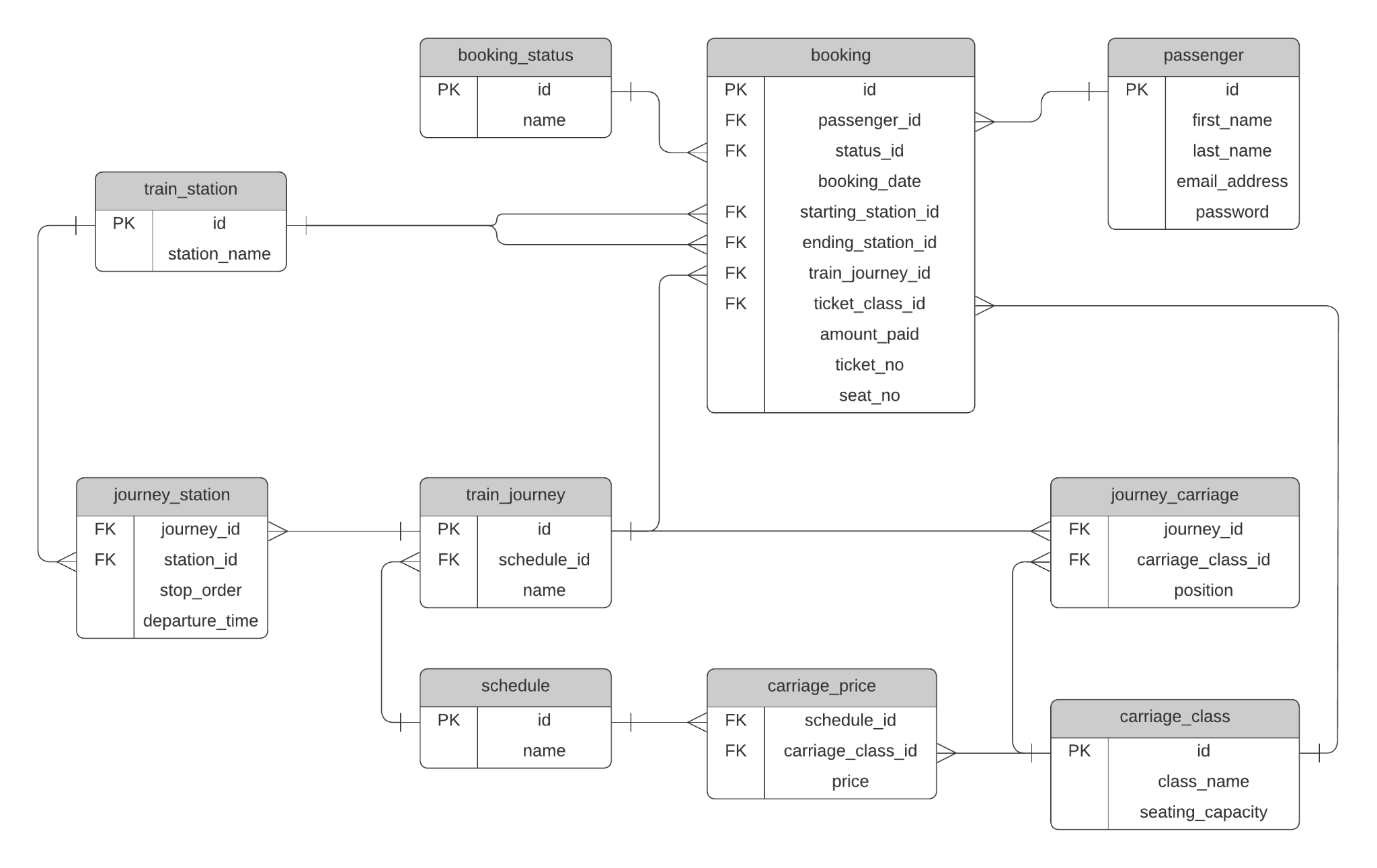
Entity Relationship Diagram
Here's the ERD for this database:
The Tables
This section explains each of the 10 tables and their columns.
train_station
A train station that exists on the train network. A train can arrive and depart from a train station as part of its journey.
| Column | Description | Sample Data |
|---|---|---|
| id | Primary key. A unique identifier for the row. | 1, 2, 3 |
| station_name | A name of the train station, which can be displayed on the website for users to identify it. | Penn Station, South Station |
train_journey
A single journey of a train that starts at one station at one time and ends at another station at another time.
| Column | Description | Sample Data |
|---|---|---|
| id | Primary key. A unique identifier for the row. | 1, 2, 3 |
| schedule_id | A foreign key to the schedule record for this journey, so we can tell whether this journey is for a Weekday, Weekend, or some other schedule. | 1, 2, 3 |
| name | The name given to this journey so it can be shown on the website if needed | "9:05 Penn Station to Boston South Station" "12:45 Chicago to Washington DC" |
journey_station
A combination of all of the stations that are included in a train journey.
| Column | Description | Sample Data |
|---|---|---|
| journey_id | The foreign key to the train journey table, to indicate which journey this record is for. | 1, 2, 3 |
| station_id | The foreign key to the train station table, to indicate which station this record is for. | 1, 4, 9 |
| stop_order | A number that indicates the sequence or order that the train journey takes. It can be used to show the route that the journey takes (the stations and the order they stop in) | 1 for the first station, 2 for the next station, and so on. |
| departure_time | The time that the train departs from this station. | 9:10, 11:15, 16:21 |
schedule
A list of different schedules that can be applied to a train journey, because a train journey can run on a Weekday schedule, a Weekend schedule, or even a public holiday.
| Column | Description | Sample Data |
|---|---|---|
| id | Primary key. A unique identifier for the row. | 1, 2, 3 |
| name | A name for the schedule which can be displayed on the website and understood by users. | Weekday, Weekend, Public Holiday |
carriage_class
A list of different classes of train carriages. In real trains, different classes have different quality seating and amenities. In the system, different classes have different prices and seating capacity.
| Column | Description | Sample Data |
|---|---|---|
| id | Primary key. A unique identifier for the row. | 1, 2, 3 |
| class_name | The name of the class, which can be shown to a user and understood by a user | First, Second, Economy |
| seating_capacity | The number of seats available on a carriage of this class. The maximum number of passengers that can book for this class of carriage. | 20, 50, 100 |
journey_carriage
A record of carriages for each train journey, because each train has many carriages, and a carriage can be used for many trains.
| Column | Description | Sample Data |
|---|---|---|
| journey_id | A foreign key to the train journey table, to indicate which journey this carriage is for. | 1, 2, 3 |
| carriage_class_id | A foreign key to the carriage class table, to indicate which class this carriage is for. | 1, 2, 3 |
| position | The position in the train that the carriage sits. This can help with printing on tickets or informing the passenger where their carriage is. | 1, 3, 6 |
carriage_price
A record that captures the price for a ticket on a specific class of carriage for a specific schedule. For example, a weekday First Class ticket, or a weekend Economy ticket.
| Column | Description | Sample Data |
|---|---|---|
| schedule_id | A foreign key for the schedule that identifies which schedule the price applies to. | 1, 2, 3 |
| carriage_class_id | A foreign key for the carriage class that identifies which class the price applies to | 1, 2, 3 |
| price | The price for the combination of schedule and class | 20, 45, 200, 280 |
booking
A record of a booking that a passenger has made, with references to all of the other information for the booking.
| Column | Description | Sample Data |
|---|---|---|
| id | Primary key. A unique identifier for the row. | 1, 2, 3 |
| passenger_id | A foreign key to the passenger table to identify the passenger that the booking is for | 1, 5, 18, 20 |
| status_id | A foreign key to the booking status table to identify the status of this booking | 1, 2 |
| booking_date | The date that the booking was made | 2023-08-30, 2023-09-21, 2024-03-05 |
| starting_station_id | A foreign key to the train station table to identify the station that the booking starts at (the station where the passenger gets onto the train). | 3, 15, 29 |
| ending_station_id | A foreign key to the train station table to identify the station that the booking finishes at (the station where the passenger gets off the train) | 4, 18, 22 |
| train_journey_id | A foreign key to the train journey table, to indicate the journey that has been booked by the passenger. | 1, 3, 6 |
| ticket_class_id | A foreign key to the carriage_class table, to indicate the class of the ticket that the passenger has booked. | 1, 2, 3 |
| amount_paid | The amount paid for this booking by the passenger | 20, 25, 50, 98 |
| ticket_no | A number that identifies the ticket for this booking, which can be printed or displayed on the ticket. | 15, 80, 231 |
| seat_no | The number of the seat that the passenger has booked on a carriage. This can be printed or displayed on the ticket | 3, 15, 29 |
passenger
The passenger who has made the booking, and also the person who can login to the booking system.
| Column | Description | Sample Data |
|---|---|---|
| id | Primary key. A unique identifier for the row. | 1, 2, 3 |
| first_name | The first name of the passenger | John, Sandip, Stephanie |
| last_name | The last name of the passenger | Kumar, Smith, Jones |
| email_address | The email address for the passenger, which can be used to send booking details to and to login. | john@apple.com |
| password | The password for this passenger for logging into the booking system. | An encrypted value for the password |
booking_status
A lookup table for the status of a booking, such as Active or Cancelled.
| Column | Description | Sample Data |
|---|---|---|
| id | Primary key. A unique identifier for the row. | 1, 2, 3 |
| name | The status value that is shown on the screen and understandable by the user | Active, Cancelled, Pending |
SQL Script
Here is the SQL code to create the tables for this database.
The script is written for MySQL, but it can easily be modified to work on your preferred database vendor by changing the data types and removing the IF EXISTS (if your database doesn't support it).
  1CREATE DATABASE train_booking;
  2
  3USE train_booking;
  4DROP TABLE IF EXISTS booking;
  5DROP TABLE IF EXISTS passenger;
  6DROP TABLE IF EXISTS booking_status;
  7DROP TABLE IF EXISTS journey_carriage;
  8DROP TABLE IF EXISTS carriage_price;
  9DROP TABLE IF EXISTS carriage_class;
 10DROP TABLE IF EXISTS journey_station;
 11DROP TABLE IF EXISTS train_station;
 12DROP TABLE IF EXISTS train_journey;
 13DROP TABLE IF EXISTS schedule;
 14
 15CREATE TABLE schedule (
 16  id INT AUTO_INCREMENT,
 17  name VARCHAR(200),
 18  CONSTRAINT pk_schedule PRIMARY KEY (id)
 19);
 20
 21CREATE TABLE train_journey (
 22  id INT AUTO_INCREMENT,
 23  schedule_id INT,
 24  name VARCHAR(500),
 25  CONSTRAINT pk_trainjourney PRIMARY KEY (id),
 26  CONSTRAINT fk_ts_schedule FOREIGN KEY (schedule_id) REFERENCES schedule (id)
 27);
 28
 29CREATE TABLE train_station (
 30  id INT AUTO_INCREMENT,
 31  station_name VARCHAR(200),
 32  CONSTRAINT pk_trainstation PRIMARY KEY (id)
 33);
 34
 35CREATE TABLE journey_station (
 36  journey_id INT,
 37  station_id INT,
 38  stop_order INT,
 39  departure_time DATETIME,
 40  CONSTRAINT fk_js_journey FOREIGN KEY (journey_id) REFERENCES train_journey (id),
 41  CONSTRAINT fk_js_station FOREIGN KEY (station_id) REFERENCES train_station (id)
 42);
 43
 44CREATE TABLE carriage_class (
 45  id INT AUTO_INCREMENT,
 46  class_name VARCHAR(50),
 47  seating_capacity INT,
 48  CONSTRAINT pk_carclass PRIMARY KEY (id)
 49);
 50
 51CREATE TABLE carriage_price (
 52  schedule_id INT,
 53  carriage_class_id INT,
 54  price INT,
 55  CONSTRAINT fk_carprice_schedule FOREIGN KEY (schedule_id) REFERENCES schedule (id),
 56  CONSTRAINT fk_carprice_class FOREIGN KEY (carriage_class_id) REFERENCES carriage_class (id)
 57);
 58
 59CREATE TABLE journey_carriage (
 60  journey_id INT,
 61  carriage_class_id INT,
 62  position INT,
 63  CONSTRAINT fk_jc_journey FOREIGN KEY (journey_id) REFERENCES train_journey (id),
 64  CONSTRAINT fk_jc_carclass FOREIGN KEY (carriage_class_id) REFERENCES carriage_class (id)
 65);
 66
 67CREATE TABLE booking_status (
 68  id INT AUTO_INCREMENT,
 69  name VARCHAR(50),
 70  CONSTRAINT pk_bookingstatus PRIMARY KEY (id)
 71);
 72
 73CREATE TABLE passenger (
 74  id INT AUTO_INCREMENT,
 75  first_name VARCHAR(500),
 76  last_name VARCHAR(500),
 77  email_address VARCHAR(350),
 78  password VARCHAR(500),
 79  CONSTRAINT pk_passenger PRIMARY KEY (id)
 80);
 81
 82CREATE TABLE booking (
 83  id INT AUTO_INCREMENT,
 84  passenger_id INT,
 85  status_id INT,
 86  booking_date DATE,
 87  starting_station_id INT,
 88  ending_station_id INT,
 89  train_journey_id INT,
 90  ticket_class_id INT,
 91  amount_paid INT,
 92  ticket_no INT,
 93  seat_no VARCHAR(5),
 94  CONSTRAINT pk_booking PRIMARY KEY (id),
 95  CONSTRAINT fk_booking_passenger FOREIGN KEY (passenger_id) REFERENCES passenger (id),
 96  CONSTRAINT fk_booking_status FOREIGN KEY (status_id) REFERENCES booking_status (id),
 97  CONSTRAINT fk_booking_startstn FOREIGN KEY (starting_station_id) REFERENCES train_station (id),
 98  CONSTRAINT fk_booking_endstn FOREIGN KEY (ending_station_id) REFERENCES train_station (id),
 99  CONSTRAINT fk_booking_journey FOREIGN KEY (train_journey_id) REFERENCES train_journey (id),
100  CONSTRAINT fk_booking_class FOREIGN KEY (ticket_class_id) REFERENCES carriage_class (id)
101);
Want to design a database from scratch?
Design Any Database in 60 Minutes is a 7-step framework that takes you from a real-world requirement to a working schema. You can get it here: Design Any Database.