Bonus: Database Redesign Case Study for 2,241 Tables
What's in this guide
This guide goes with my video titled "How I Redesigned a Database With 2,241 Tables". It covers a database posted on Reddit that has one table for every client, each holding a single row of JSON. We look at what's wrong with it, redesign it as 3 tables in PostgreSQL, and move all of the data across using SQL.
The original database isn't available, so I rebuilt it from the Reddit post (r/programminghorror, "DB with 2241 tables"). The post didn't show what was inside the JSON, so the fields in it are my reconstruction for a healthcare research company.
The scripts on GitHub
All of the SQL lives in my GitHub repository, so you can view it, copy it or download it: GitHub Repo Folder
| File | What it does |
|---|---|
| 01 Build Original Database.sql | Creates the 2,241 client_ tables, each with one row of JSON. |
| 02 Demo Queries.sql | The SQL queries that were ran in the video. |
| 03 New Schema.sql | Creates the new client, study and enrolment tables and their indexes. |
| 04 Migration.sql | The full migration from the video: staging, checks, inserts and validation. |
How to run it
You need PostgreSQL 12 or later (I tested this on 16) and an empty practice database. The scripts use the public schema. Run them in order: 01, 03, then 04.
The data in script 01 is generated from a fixed formula, not random numbers, so you get the same database every time.
The Original Database
Every client has a table named client_ followed by their ID. Each table has one row, and that row is one column of JSON. A few tables have a second column, which in my rebuilt version is called notes.
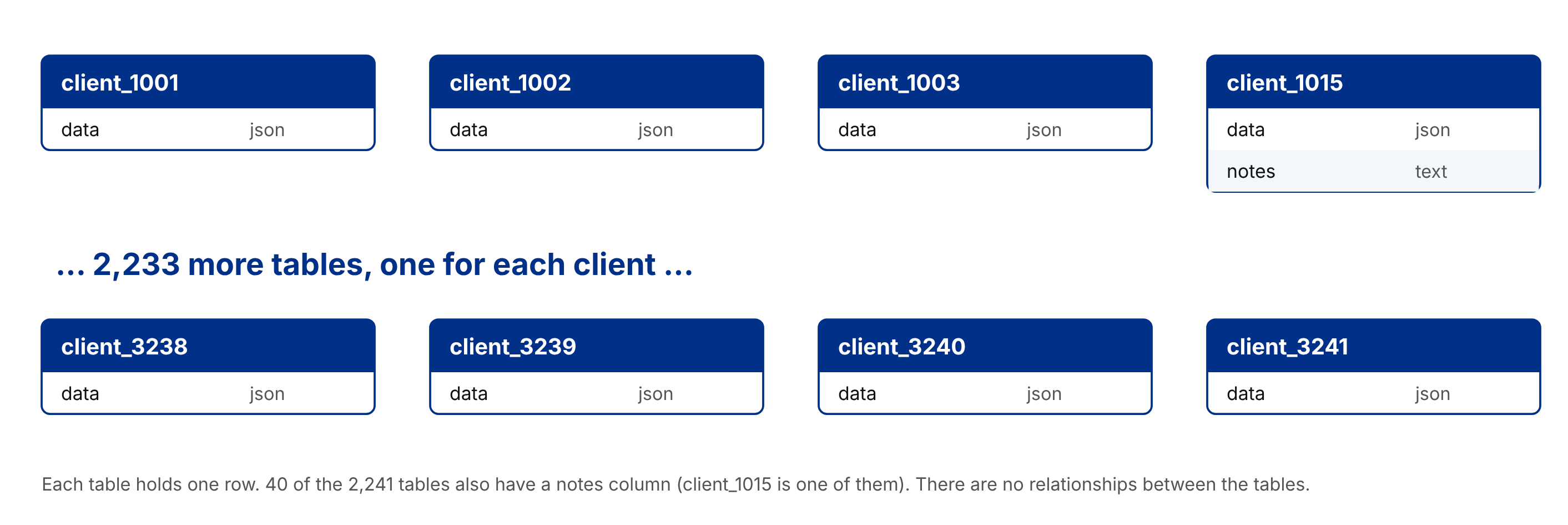
The tables
1CREATE TABLE client_1042 (data JSON);
2
3-- 40 of the 2,241 tables also have a second column:
4CREATE TABLE client_1015 (data JSON, notes TEXT);
Script 01 creates all 2,241 of them with a loop. Tables are created without quotes, so PostgreSQL stores Client_1042 as client_1042.
One client's row
Everything about a client sits in that one JSON value, including the number of days since they were born and a list of the studies they're enrolled in.
 1{
 2  "first_name": "Emma",
 3  "last_name": "Walsh",
 4  "sex": "F",
 5  "email": "emma.walsh@example.com",
 6  "phone": "0412 555 018",
 7  "days_since_birth": 19850,
 8  "enrolments": [
 9    {
10      "study_code": "CARD-2019",
11      "study_name": "Cardiac Recovery Study",
12      "enrolled_date": "2021-03-14",
13      "status": "Active"
14    }
15  ]
16}
What's wrong with it
| Problem | Why it matters |
|---|---|
| One table per client | A table should hold many rows of the same kind of thing. A new client means a new table, and any search across clients runs one query per table: 2,241 queries. |
| Everything in JSON | The database can't check anything. Nothing stops one client having last_name and another having surname, or dates stored in different formats. |
| Age stored as days since birth | The value is out of date the next day, so a job runs at 3 AM to add 1 to every table. If it ever fails or runs twice, the numbers are wrong and there's no way to tell which. |
| A summary table as a workaround | The same client data lives in 2 places and the application has to keep them in sync. |
| No normalisation | Study names are repeated inside every client's JSON, so renaming a study means updating hundreds of tables. |
My rebuilt data includes the kinds of mess this design invites: 133 clients use surname instead of last_name, 145 have no phone number, and the study DIAB-2020 is stored under 2 different names.
The New Design
The new design has 3 tables: client, study and enrolment. 2,241 tables become 3.
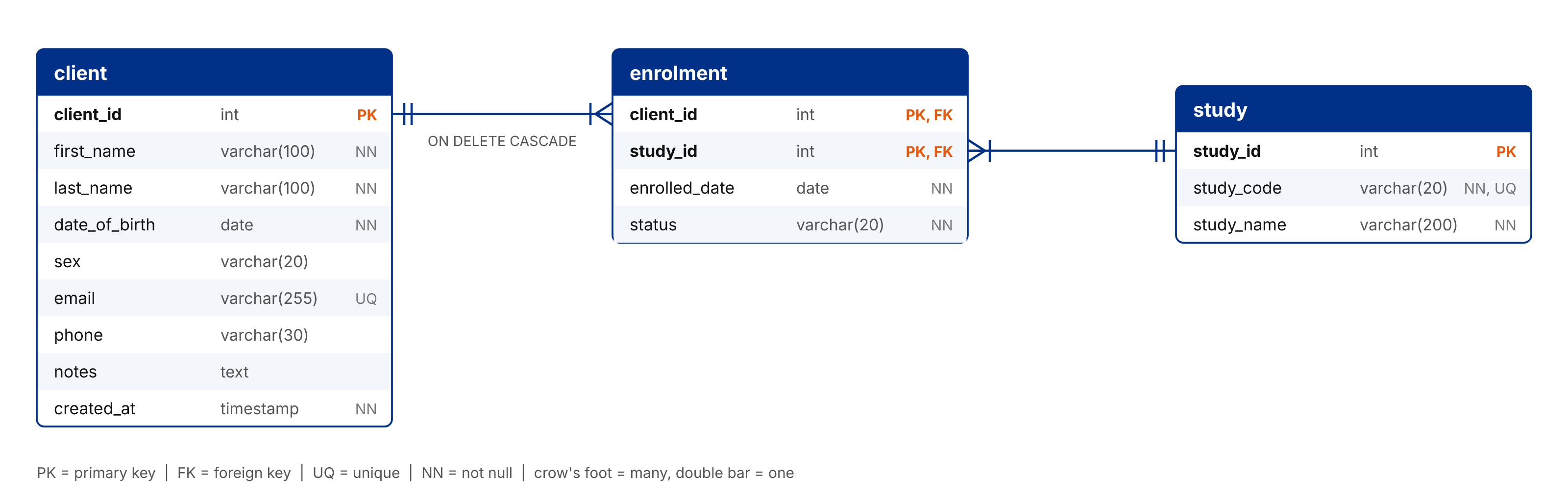
What each table does
| Table | Purpose |
|---|---|
| client | One row per client. Every value that was inside the JSON now has its own column with a proper data type. |
| study | Each research study is stored once. If a study is renamed, you update one row. |
| enrolment | Links clients to studies. One client can be in many studies and one study has many clients, so this is a joining table. It also stores the enrolled date and status. |
The client table
| Column | Type | Notes |
|---|---|---|
| client_id | INT, identity, primary key | Keeps the ID from the old table name. GENERATED BY DEFAULT lets the migration insert the existing IDs, so anything that refers to client 1042 still works. |
| first_name | VARCHAR(100), NOT NULL | Every client must have a name. |
| last_name | VARCHAR(100), NOT NULL | Every client must have a name. |
| date_of_birth | DATE, NOT NULL | Replaces days_since_birth. It never needs updating, and age is calculated with AGE(date_of_birth). |
| sex | VARCHAR(20) | Optional. |
| VARCHAR(255), UNIQUE | Two clients can't share an address. | |
| phone | VARCHAR(30) | Optional. |
| notes | TEXT | From the second column on some of the old tables. |
| created_at | TIMESTAMP, NOT NULL | Defaults to the current time. |
The study table
| Column | Type | Notes |
|---|---|---|
| study_id | INT, identity, primary key | |
| study_code | VARCHAR(20), NOT NULL, UNIQUE | For example CARD-2019. |
| study_name | VARCHAR(200), NOT NULL | Stored once per study. |
The enrolment table
| Column | Type | Notes |
|---|---|---|
| client_id | INT, foreign key to client | Part of the primary key. ON DELETE CASCADE removes a client's enrolments when the client is deleted. |
| study_id | INT, foreign key to study | Part of the primary key, so a client can't be enrolled in the same study twice. |
| enrolled_date | DATE, NOT NULL | |
| status | VARCHAR(20), NOT NULL |
Where Each Part of the JSON Goes
Every value in the old JSON has a home in the new design.
| In the old JSON | In the new design |
|---|---|
| first_name | client.first_name |
| last_name (or surname) | client.last_name |
| days_since_birth | client.date_of_birth |
| sex, email, phone | client.sex, email, phone |
| notes column (40 tables only) | client.notes |
| enrolments[].study_code, study_name | study.study_code, study_name |
| enrolments[].enrolled_date, status | enrolment.enrolled_date, status |
Row-level security and JSONB
If client data really does need to be kept separate, PostgreSQL row-level security can limit which rows each database user sees in the single client table. And if a few attributes genuinely vary from client to client, one JSONB column on client is a reasonable place for them.
The Migration
The migration has 4 steps. We load everything into one staging table, check the JSON, insert it into the new tables, and then validate the result. The old tables are never changed. Every fix is made in the staging table, so you can always go back.
The full SQL for all 4 steps is in GitHub. Each statement has comments explaining what it does.
Step 1: Load into a staging table
A DO block loops through every table whose name matches ^client_[0-9]+$ and uses dynamic SQL to copy its JSON into client_staging. The client ID comes from the table name. A regular expression is used instead of LIKE because LIKE would also match client_staging, and the underscore is a wildcard. The primary key on the staging table also catches any old table with more than one row.
Step 2: Check the JSON
Before trusting the data, count which keys appear across all clients with jsonb_object_keys. If the data were consistent, every key would appear 2,241 times. In the rebuilt database you'll see:
| json_key | client_count |
|---|---|
| email, enrolments, sex, first_name, days_since_birth | 2,241 each |
| last_name | 2,108 |
| phone | 2,096 |
| surname | 133 |
Then find the 40 tables with a second column, and check that each study code has only one name. DIAB-2020 has 2: "Type 2 Diabetes Prevention Study" (318 enrolments) and "T2 Diabetes Prevention Study" (113). The new study table stores each study once, so we fix the name in the staging table before inserting.
Step 3: Insert into the new tables
Insert the clients first, building the SELECT in stages so you can check the values before inserting. Then reset the identity sequence with setval so the next new client gets an unused ID. Then insert the studies with DISTINCT, and finally the enrolments, joining to study to swap the study code for the new study_id. The cast to DATE also acts as a check on every enrolled_date.
Step 4: Validate
Check the row counts (2,241 in both client_staging and client), spot-check a few clients with the old JSON next to the new row, and look for impossible dates of birth. Dates of birth are only as accurate as the nightly job was over the years, so a date that's off by a few days won't be caught. If you have the original intake forms, compare against those.
Migrating a live system
The script migrates in one go because it's a demo. On a live system you'd migrate in stages: keep the new tables in sync with the old ones, move the application's reads to the new tables, then its writes, and only then drop the old tables. It takes longer, but each step is smaller and easier to test, and you can go back if something breaks.
The Result
The search from the video: every client aged 50 or over who is enrolled in the Cardiac Recovery Study.
The old way
One query per table, 2,241 in total, collecting the matching IDs into a temporary table. Age is stored as days, so "over 50" has to be 50 x 365, which ignores leap years.
The new way
One query with 2 joins, instead of 2,241 queries. "Over 50" now means born at least 50 years ago, not 18,250 days ago. On the rebuilt data both searches return 237 clients.
1SELECT c.client_id, c.first_name, c.last_name,
2  AGE(c.date_of_birth) AS age
3FROM client c
4INNER JOIN enrolment e ON e.client_id = c.client_id
5INNER JOIN study s ON s.study_id = e.study_id
6WHERE s.study_code = 'CARD-2019'
7AND c.date_of_birth <= CURRENT_DATE - INTERVAL '50 years';
Want to design a database from scratch?
Design Any Database in 60 Minutes is a 7-step framework that takes you from a real-world requirement to a working schema. You can get it here: Design Any Database.